Spark Architecture Tutorial: A Beginner-Friendly Guide
Apache Spark is a fast, general-purpose, distributed computing engine designed to make big data processing simple and scalable. While it is famous for speed, the real power of Spark comes from its architecture: how it builds and executes distributed jobs, manages memory, recovers from failures, and unifies batch, streaming, and machine learning workloads. This beginner-friendly tutorial explains Spark architecture step by step, using plain language and practical examples so you can understand how Spark works under the hood and apply that knowledge to build reliable and high-performance pipelines.
What Is Apache Spark?
Apache Spark is an open-source engine for large-scale data processing. It provides high-level APIs in Scala, Python, SQL, Java, and R, enabling you to manipulate distributed datasets as if they were local collections or SQL tables. Spark is designed to run on clusters and can process data orders of magnitude faster than traditional MapReduce by keeping data in memory and optimizing execution plans aggressively.
You can use Spark for:
- Batch ETL and data warehousing (Spark SQL, DataFrames)
- Streaming and near real-time analytics (Structured Streaming)
- Machine learning and feature engineering (MLlib)
- Graph processing (GraphX)
Why Spark Architecture Matters
Understanding Spark architecture helps you write code that scales and performs well. It informs how you structure transformations, choose file formats, partition data, size clusters, and troubleshoot slow jobs. By the end of this tutorial, you will know what happens when you call an action in your code, how Spark turns your logic into physical tasks, and where time and resources are spent.
High-Level Components of Spark Architecture
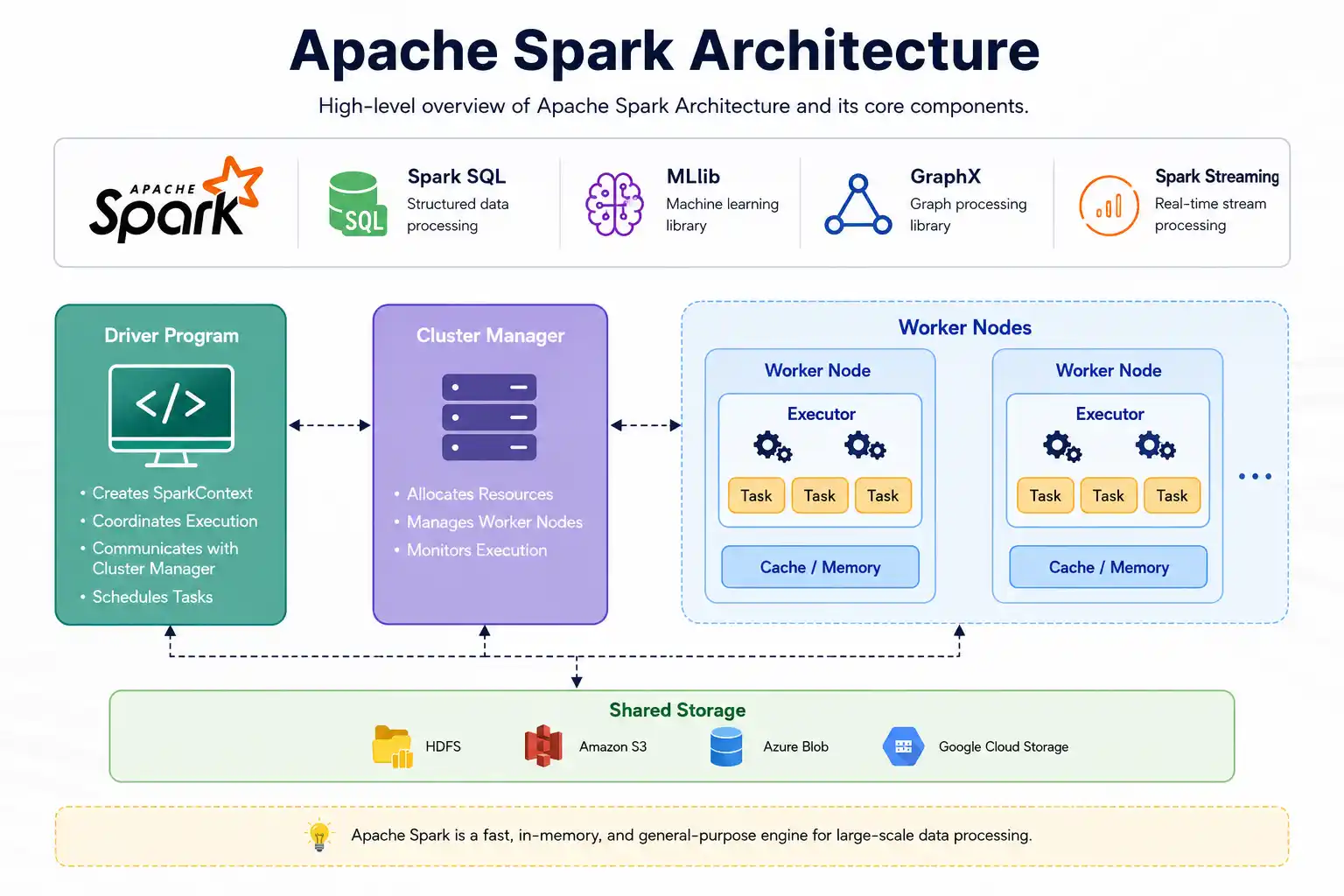
At a high level, a Spark application consists of a driver process that coordinates work and multiple executor processes that perform the actual computation on worker nodes. A cluster manager allocates resources (CPU and memory) across the cluster.
Driver
The driver is the brain of a Spark application. It hosts your application code (e.g., the Python or Scala process you launch), creates the SparkSession, maintains metadata about RDDs and DataFrames, builds query plans, and schedules tasks. The driver also tracks the DAG (Directed Acyclic Graph) of transformations and orchestrates the conversion of logical plans into physical execution.
Cluster Manager
The cluster manager is responsible for resource allocation. Spark supports multiple cluster managers:
- Standalone (Spark’s built-in manager)
- YARN (Hadoop cluster manager)
- Kubernetes
- Mesos (less common today)
The driver negotiates with the cluster manager to request executors, which are containers or processes that run tasks.
Executors
Executors are worker processes launched for your application. Each executor:
- Runs tasks assigned by the driver
- Stores data in memory or on disk for caching and shuffles
- Reports status and metrics back to the driver
Executors live for the duration of your application (unless dynamic allocation is enabled) and have a configured amount of memory and CPU cores.
SparkSession and SparkContext
SparkSession is the entry point for using Spark (especially in Spark SQL). It encapsulates the older SparkContext (for RDD APIs) and SQLContext (for SQL and DataFrames). Most applications start with something like:
from pyspark.sql import SparkSession
spark = SparkSession.builder \
    .appName("Spark Architecture Tutorial") \
    .getOrCreate()
From Code to Cluster: The Spark Execution Flow
What happens when you call an action like count() or collect()? Spark converts your code into a logical plan, optimizes it, and then executes it as tasks across executors.
1) You Write Transformations and Actions
Transformations (like select, filter, map, join) are lazy: Spark records them but does not execute immediately. An action (like show, count, save) triggers execution.
2) Logical Plan and the Catalyst Optimizer
For DataFrames and SQL, Spark builds a logical plan representing your query. The Catalyst optimizer analyzes and rewrites this plan using rules: constant folding, predicate pushdown, projection pruning, and join reordering (with statistics). The result is an optimized logical plan.
3) Physical Plan and Tungsten
Spark then selects a physical plan—the concrete set of operators and join strategies—and uses the Tungsten execution engine to manage memory and generate efficient bytecode via Whole-Stage Code Generation. This approach reduces Java Virtual Machine (JVM) overhead and speeds up computation.
4) DAG Scheduler: Jobs, Stages, and Tasks
When you call an action, Spark’s DAG scheduler breaks the plan into one or more jobs. Each job is divided into stages separated by shuffle boundaries. Within a stage, the work is parallelized into many tasks, typically one per data partition. Tasks are the smallest unit of work sent to executors.
5) Task Scheduler and Execution
The task scheduler assigns tasks to executors, balancing locality (running where data resides) and fairness. Executors run tasks, read and write data, and report progress. If a task fails, Spark retries it automatically.
6) Speculative Execution
To mitigate stragglers (slow tasks), Spark can run speculative execution: it launches duplicate copies of slow tasks on other executors and keeps the first to finish. This improves tail latency for jobs with skewed or flaky nodes.
Core Data Abstractions: RDDs, DataFrames, and Datasets
RDD (Resilient Distributed Dataset)
RDDs are Spark’s original abstraction: immutable, partitioned collections with a lineage graph for fault tolerance. You perform functional transformations (map, filter, reduceByKey) on RDDs. RDDs offer fine-grained control but fewer optimizations.
DataFrames
DataFrames are distributed tables with named columns. They leverage Catalyst for SQL-level optimizations and Tungsten for efficient memory usage. DataFrames are the most commonly used API because they are concise, expressive, and fast.
Datasets
Datasets (Scala/Java) provide type safety with encoder-based serialization. In Python, the closest equivalent is the DataFrame. For most workloads, DataFrames are recommended unless you need strict type guarantees in Scala/Java.
Which API Should You Use?
- DataFrames for analytics, SQL, and general ETL (best performance with Catalyst/AQE)
- RDDs for low-level transformations, custom partitioners, or when you need full control
- Datasets (Scala/Java) for type safety
Transformations vs. Actions
Transformations build a plan; actions run it.
Narrow vs. Wide Transformations
- Narrow transformations (e.g., map, filter) operate within a partition. No shuffle required.
- Wide transformations (e.g., groupBy, join, repartition) require data to move across the network. Triggers a shuffle and stage boundary.
Common Transformations and Actions
- Transformations: select, withColumn, filter, groupBy, agg, join, repartition, coalesce, map, flatMap
- Actions: show, count, collect, take, foreach, save (e.g., write.parquet)
Shuffles Explained
A shuffle happens when Spark needs to redistribute data across partitions—for example, to group identical keys together before an aggregation or to line up keys for a join. Shuffles are expensive because they involve disk and network I/O.
Why Do Shuffles Happen?
- Group-based operations: groupBy, reduceByKey, aggregateByKey
- Joins on non-partition-aligned keys
- Repartitioning and sorting
How Shuffles Work
Shuffle write tasks on upstream executors spill partitioned data to disk. Shuffle read tasks on downstream executors fetch relevant blocks over the network. Spark manages these via the shuffle manager, external shuffle service (optional), and storage levels.
Minimizing Shuffle Cost
- Use broadcast joins for small dimension tables.
- Partition data by join keys when appropriate.
- Avoid unnecessary repartition; consider coalesce to reduce partitions without a full shuffle.
- Use efficient file formats and pruning to reduce data size.
Memory Management in Spark
Spark uses a unified memory manager to divide executor memory into regions for execution (shuffle, joins, sorts) and storage (caching/persisting). Understanding this helps prevent out-of-memory errors and performance degradation.
Execution vs. Storage Memory
- Execution memory: used for shuffles, joins, sorts, and aggregations.
- Storage memory: used for caching/persisting RDDs/DataFrames and broadcast variables.
These regions can borrow from each other within limits, but heavy shuffles can evict cached data and vice versa.
Cache and Persist
Use cache() or persist() to keep reused DataFrames in memory. Choose a storage level:
- MEMORY_ONLY: fastest reads, recomputes partitions that don’t fit
- MEMORY_AND_DISK: spills partitions that don’t fit to disk
- DISK_ONLY: useful for very large datasets with limited memory
df = spark.read.parquet("s3://bucket/events/")
filtered = df.filter("event_type = 'click'")
filtered.cache()  # or filtered.persist()
print(filtered.count())  # triggers caching
Serialization
For RDDs and Python UDFs, serialization matters. Kryo is faster and more compact than Java serialization for JVM languages. In Python, minimizing pickled object size and using vectorized UDFs (pandas UDFs) improves performance.
Garbage Collection Tips
- Prefer DataFrame operations and built-in functions over UDFs to reduce Python-JVM overhead.
- Avoid creating huge Java/Scala objects; use primitive types where possible.
- Use efficient encoders (Datasets) or columnar formats (DataFrames).
Fault Tolerance: How Spark Recovers From Failures
Spark’s lineage model makes it resilient. RDDs and DataFrames record the transformations needed to recompute partitions. If an executor fails and data is lost, Spark can recompute it from the source or prior stages.
Lineage and Checkpointing
- Lineage: each partition knows how it was derived; recomputation uses this DAG.
- Checkpointing: truncates lineage by writing data to reliable storage (e.g., HDFS). Useful for long chains or iterative algorithms.
Cluster Managers and Deployment Modes
Standalone
Spark’s built-in manager is easy to set up and good for development or small clusters.
YARN
Integrates with Hadoop ecosystems. You submit Spark applications to YARN, which handles resource management and isolation.
Kubernetes
Runs Spark in containers. Great for cloud-native workflows with Helm charts, autoscaling, namespaces, and fine-grained resource controls.
Client vs. Cluster Mode
- Client mode: the driver runs where you submit the job (e.g., your laptop or an edge node). Good for interactive use.
- Cluster mode: the cluster launches the driver inside the cluster. Reliable for production.
Structured Streaming Architecture
Structured Streaming unifies batch and streaming with the same DataFrame API. It treats streaming queries as incremental plans that process data as it arrives.
Micro-Batch Model
By default, Structured Streaming uses micro-batches: it repeatedly triggers small batch jobs on new data. Each trigger produces a new result, which can be appended, updated, or overwritten depending on the output mode.
Sources and Sinks
- Sources: Kafka, files (S3/HDFS), sockets, rate source, custom connectors
- Sinks: Kafka, files, console, memory table, Delta Lake, JDBC
State, Watermarks, and Exactly-Once
- Stateful operations (e.g., windowed aggregations) keep state across triggers.
- Watermarks let Spark drop late data beyond a threshold to control state growth.
- Exactly-once semantics can be achieved with idempotent sinks and checkpointing.
from pyspark.sql.functions import window, col

stream = spark.readStream \
    .format("kafka") \
    .option("kafka.bootstrap.servers", "broker:9092") \
    .option("subscribe", "clicks") \
    .load()

parsed = stream.selectExpr("CAST(value AS STRING) json")
# parse JSON, extract timestamp and fields...

agg = parsed \
    .withWatermark("event_time", "10 minutes") \
    .groupBy(window(col("event_time"), "5 minutes"), col("user_id")) \
    .count()

query = agg.writeStream \
    .outputMode("update") \
    .format("console") \
    .option("checkpointLocation", "s3://bucket/chk/clicks/") \
    .start()
Storage and File Formats
The choice of file format and layout has a massive impact on performance.
Columnar Formats
- Parquet and ORC: columnar, compressed, support predicate pushdown and column pruning. Best default choice.
- Avro: row-based, good for schema evolution and Kafka interchange.
Partitioning and Small Files
- Partition by commonly filtered columns to enable partition pruning.
- Avoid too many tiny files; combine outputs with coalesce or repartition before write.
- Consider table formats like Delta Lake, Iceberg, or Hudi for ACID, vacuum, and time travel.
Performance Tuning and Best Practices
Good architecture choices often matter more than raw cluster size. Here are practical tips:
Partitioning and Parallelism
- Set spark.sql.shuffle.partitions for SQL/DataFrames (default can be high for small jobs or low for big ones). A common starting point is 2–4 tasks per core.
- Use repartition to increase parallelism and coalesce to reduce partitions without a full shuffle.
- Partition data on disk by frequently filtered columns to reduce I/O.
Join Strategies
- Broadcast hash join for small dimension tables. Hint with broadcast(df) or rely on auto-broadcast.
- Sort-merge join for large tables (requires shuffle and sort).
- Use bucketing or partitioning to reduce shuffle for repeated joins.
from pyspark.sql.functions import broadcast
big = spark.read.parquet("s3://data/facts/")
small = spark.read.parquet("s3://data/dim_users/")

result = big.join(broadcast(small), "user_id")
Skew Handling and Adaptive Query Execution (AQE)
- Data skew (a few keys dominating) causes stragglers. Use salting keys or skew hints.
- Enable AQE to coalesce shuffle partitions, change join strategies at runtime, and handle skew automatically.
Configuration Knobs
- spark.executor.memory, spark.executor.cores: size executors sensibly (e.g., 4–8 cores each to avoid too much GC pause on a single JVM).
- spark.dynamicAllocation.enabled: scale executors up/down with workload.
- spark.sql.files.maxPartitionBytes: control input split size; smaller splits increase parallelism.
- spark.serializer: use Kryo for JVM languages.
Use Built-in Functions and Vectorization
- Prefer Spark SQL functions over UDFs; they are optimized and run in the engine.
- When UDFs are necessary, consider pandas UDFs (vectorized) for better performance in PySpark.
Sample Tuning Checklist
- Validate input data format (Parquet/ORC) and pruning effectiveness.
- Inspect partitions; adjust spark.sql.shuffle.partitions.
- Broadcast small dimensions; confirm via Spark UI.
- Enable AQE; watch for skewed stages and large shuffles.
- Cache reused DataFrames; unpersist when done.
- Monitor executor memory/cores; tweak if frequent GC or OOM occurs.
Monitoring and Debugging
Spark provides multiple tools to understand what your jobs are doing.
Spark UI
- Jobs tab: overview of completed and active jobs
- Stages tab: details about tasks, shuffle read/write, time spent
- SQL tab: query plans, DAG visualization, metrics per operator
- Executors tab: memory, storage, task counts, logs
Event Logs and History Server
Enable event logging to replay applications in the History Server. This is crucial for post-mortem analysis after jobs complete.
Logging and Metrics
- Use driver and executor logs to trace errors.
- Integrate metrics with Prometheus/Grafana for long-term monitoring.
Security Basics
Security considerations include authentication, encryption, and secret management.
Authentication and Encryption
- Kerberos for authentication in Hadoop/YARN ecosystems.
- TLS/SSL for encrypting data in transit between components.
- At-rest encryption via storage layer (e.g., S3, HDFS KMS).
Secret Management
- Avoid embedding credentials in code; use environment variables, KMS, or secret stores.
- Mask sensitive data in logs; sanitize outputs.
Common Architecture Patterns
Reliable ETL Pipelines
- Ingest raw events from Kafka/files into a bronze/raw table.
- Clean, deduplicate, and parse into a silver/curated table.
- Aggregate/enrich into a gold/analytics table for BI and ML.
Use partitioned Parquet/Delta and schedule with a workflow manager. Enable AQE and data skipping features where available.
Near Real-Time Analytics with Structured Streaming
Combine streaming (for fresh data) with batch backfills and the same DataFrame logic. Persist state and use watermarks for bounded state size.
Feature Engineering for ML
Use DataFrames to create features (e.g., session counts, recency, frequency), cache intermediate results, and write features to a feature store or table format with versioning.
Putting It Together: A Mini Walkthrough
Below is a simplified example that highlights architectural choices while building a small analytics job.
# 1) Start a session
spark = SparkSession.builder.appName("mini-arch-walkthrough").getOrCreate()

# 2) Read columnar data with partition pruning
logs = spark.read.parquet("s3://data/logs/date=2026-06-*")

# 3) Filter early (predicate pushdown), select needed columns only
clean = logs.select("user_id", "event_type", "ts", "country").filter("country = 'US'")

# 4) Read a small dimension and broadcast it
users = spark.read.parquet("s3://data/dim_users/").select("user_id", "segment")

# 5) Join with broadcast to avoid shuffle on the large side
joined = clean.join(broadcast(users), "user_id", "left")

# 6) Aggregate by segment and day (may cause a shuffle)
from pyspark.sql.functions import to_date, col
agg = joined.withColumn("day", to_date(col("ts"))).groupBy("segment", "day").count()

# 7) Cache if reusing results downstream
agg.cache()

# 8) Write optimized output (partitioned Parquet)
agg.write.mode("overwrite").partitionBy("day").parquet("s3://data/metrics/segment_counts/")
Key points:
- Column pruning and predicate pushdown reduce I/O.
- Broadcast join avoids a large shuffle.
- Partitioned Parquet improves downstream reads.
Glossary of Key Terms
- Driver: coordinates the application and schedules tasks.
- Executor: runs tasks and stores data for the application.
- Task: smallest unit of work; processes one partition.
- Stage: group of tasks that can run without a shuffle boundary.
- Job: submitted unit triggered by an action.
- DAG: Directed Acyclic Graph of transformations.
- Catalyst: optimizer for SQL/DataFrames.
- Tungsten: memory and code generation engine for efficient execution.
- Shuffle: data redistribution across partitions, often expensive.
- AQE: Adaptive Query Execution that optimizes at runtime.
Frequently Asked Questions (FAQ)
1) Is Spark faster than Hadoop MapReduce?
Yes, for many workloads. Spark keeps data in memory between stages and uses optimized execution plans. However, performance depends on data format, cluster sizing, and job design.
2) Should I use RDDs or DataFrames?
Use DataFrames for most tasks. They benefit from Catalyst and Tungsten, making them faster and easier to optimize. Use RDDs only when you need low-level control or custom partitioning logic.
3) What is a shuffle and why is it slow?
A shuffle redistributes data across the cluster (e.g., for joins, group-bys). It is slow because it writes intermediate data to disk and transfers it over the network, incurring serialization and I/O overhead.
4) How do I choose the number of partitions?
As a rule of thumb, aim for a few tasks per CPU core. Adjust spark.sql.shuffle.partitions and monitor stage runtimes. Too few partitions underutilizes the cluster; too many increases scheduling overhead.
5) When should I broadcast a table?
Broadcast a small dimension table when joining with a much larger fact table. This avoids shuffling the large dataset. You can rely on Spark’s auto-broadcast or explicitly use broadcast().
6) How does Spark handle failures?
Spark recomputes lost partitions using lineage. It retries failed tasks and can speculatively run slow tasks on other executors to reduce tail latency.
7) What’s the difference between client and cluster mode?
In client mode, the driver runs outside the cluster (e.g., your laptop). In cluster mode, the driver runs inside the cluster, improving reliability for production.
8) How does Structured Streaming achieve exactly-once?
By using checkpointing, idempotent sinks, and transactional sources/sinks where possible. With these in place, each record is processed once even across failures.
9) Why are small files a problem?
Each file introduces metadata overhead and can lead to too many tiny tasks, increasing scheduling and I/O overhead. Combine outputs into fewer, bigger files per partition.
10) How do I debug a slow Spark job?
Use the Spark UI to find stages with high shuffle time or skew. Check partition counts, join strategies, broadcast usage, and data sizes. Enable AQE and review event logs for detailed metrics.
Conclusion
Spark’s architecture balances flexibility, speed, and reliability by separating coordination (driver) from execution (executors), optimizing queries through Catalyst/Tungsten, and distributing work as tasks across a cluster. Understanding the lifecycle of a job—from logical plan to physical tasks, through stages and shuffles—equips you to write faster, more reliable pipelines. As you build applications, prefer DataFrames and SQL functions, choose efficient file formats like Parquet, minimize shuffles with smart join strategies, and use the Spark UI to validate your assumptions. With these foundations, you can scale from a laptop prototype to a production-grade, cluster-powered analytics platform with confidence.